
How to design content for SEO and reader friendliness.
Last week, I talked about how important the reader experience is for SEO and shared my SEO graphic design checklist.
Over the next four weeks, I promised:
1. Graphic design checklist (completed it)
2. Content design checklist (today!)
3. Blog template design checklist (soon!)
4. SEO design checklist (kinda soon!)
One of you reached out and suggested I put these into a Notion doc or something downloadable—great idea! When I've gone through all 4 weeks I'll send that out :)
Here's week 2:
My SEO Content Design Checklist
Content design has three objectives:
- Improve accessibility of value.
- Improve desire to consume content.
- Improve the deliverability of your message.
This is a broad topic to get your teeth into and takes time to perfect.
Let's start with structure.
✅ Clear, User-Friendly Content Structure
I use these 4 tips to prioritize my reader's busy schedules without any of my message getting lost.
1/ Be MECE
The Mutually Exclusive, Collectively Exhaustive (MECE) framework dictates that the "optimum" arrangement of information is exhaustive without repeating itself.
MECE allows you to present information in a logical, followable way, with clean buckets of analysis dedicated to each part of an argument.
We can leverage this in our blog content to increase each article's value to the reader.
Here's what MECE content looks like:

When you start a blog post with:
- H2: "What is X?"
- H2: "Why X is important"
It's highly likely that you've offended the MECE rule already. How do you explain what something is, without explaining why its uses and why those are important?
It's also VERY likely that someone who Googles "How to Solve X" already knows what "X" is and why "X" is important (don't be fooled by copycat SEO, it doesn't work anymore).
Instead, you drive much for value by concentrating your entire article on the problem to be solved and methods of solving it.
2/ Be BLUF

Bottom Line Up Front (BLUF) is literally the practice of beginning with the key message. The most important information is at the top, and you expand on it later.
This prioritizes the reader's experience: they're busy, they're moving fast.
But it also prioritizes trust. We're so used to reading content that doesn't deliver the value we expect. So starting with the value relaxes the reader from the start and incentivises them to stick around.
For example, if someone Google's "How to Block YouTube" most blog posts start with a bunch of fluff around why YouTube should be blocked:
- H1: How to Block YouTube
- H2: The Dangers of YouTube
- H2: Method 1: Blocking YouTube with Mac ScreenTime
A BLUF approach would kick off with the best method first:
- H1: How to Block YouTube
- H2: Method 1: Blocking YouTube with Mac ScreenTime
- H3: Why it's the best method
- H3: How to implement it
- H2: FAQs
- H3: The Dangers of YouTube
I talk quite a bit about introductionless content and "getting to the point"—this is a BLUF approach. The winners of SEO in 2024, in my experience in 2023, will be those who do this.
So make sure you understand search intent and deliver it ASAP.
3/ Use Introductions wisely
My SOP for writing engaging introductions is included in my eBook package on scaling content.
I offer multiple ways to write an introduction, but all have one underlying piece of advice:
- Make them short
- Make sure they hit on search intent
- Soothe the reader ASAP
Every writer I work with gets very clear advice on introductions because they're SO important.
4/ Put the crud at the end
Inserting FAQs is a common method used by SEOs to increase word count, pick up more long-tail keywords, and show Google they're being "complete".
Honestly, I still use this, too. But now I use the FAQ section as, essentially, the dumping ground for "completeness".
I want to cover all the key questions on a topic, but I don't want to bore the majority of readers to death. Most users don't have the same questions, so inserting them within content (or worse at the top of content) doesn't always make sense.
Suggestion: Focus the meat of your content on delivering search intent. And include an FAQ section at the very end that covers everything else on the topic.
✅ Readability
An (admittedly old) study found that "the total number of paragraphs read increased by 93% when readability was improved."
This rings true across all content marketing. The most consumable information is delivered in easy-to-understand bite-sized packages (LinkedIn posts, choppy copy, newspapers, best-sellers).
If you can deliver a complex message in simple language, you win.
Here's how I make my blog content more readable:
1/ Use lists
Lists make content scannable.
For example, at the beginning of this newsletter, I used this list:
"Content design has three objectives:
- Improve accessibility of value.
- Improve desire to consume content.
- Improve the deliverability of your message."
This is inherently easier to digest because it's broken up. However, I also started each list item with the same word "improve" which is like a reading lubricant.
You could further reduce the size of this list by shifting the word "improve" into the sentence before:
"Content design improves three things:
- accessibility of value
- desire to consume content
- deliverability of your message"
I left the word "improve" to emphasize it. But a general rule of thumb is to write concise copy.
2/ Readability Score
A copywriter friend of mine, Eddie Schleyner, advises that writers regularly practice rewriting (long and boring) Wikipedia articles and aim to reduce them by 75% without losing any meaning.
It's one of the best things you'll do.
I ask all my writers to pass their content through Hemingway App and aim for a readability grade of 7-10.
It's often hard to do, but if you can keep the flow and creativity of your writing while removing complex sentences...win, win.
3/ Skimmability
Tim Hanson wrote a great guide titled "If no skim, then no read."
He made three points that deserve a place in this checklist:
- Use big headings (like large font sizes)
- Write strong sub-headings (with questions in them)
- Write 1-2 sentence paragraphs (use this wisely)
The data behind each one is really interesting (the guide above is worth a read).
The deeper point here is skimmability.
Many readers skim an article before diving in. They bounce around to find what they're looking for...rather than investing in a deep read.
This is especially true when the reader comes to you via SEO (versus an established audience who reads your content all the time).
On the first brush with a brand, you don't yet know if their content is trustworthy or worth the deep dive.
Want more from me?
Check out this feedback for my monday.com case study:
"Went through the Monday case study. It was just brilliant! I think it's impossible to find such information anywhere else on the internet lol."
I have 30+ SEO case studies like this. Unlock them all for £17 here.
I also continue to get incredible feedback for my guide "How to Produce Content at Scale".
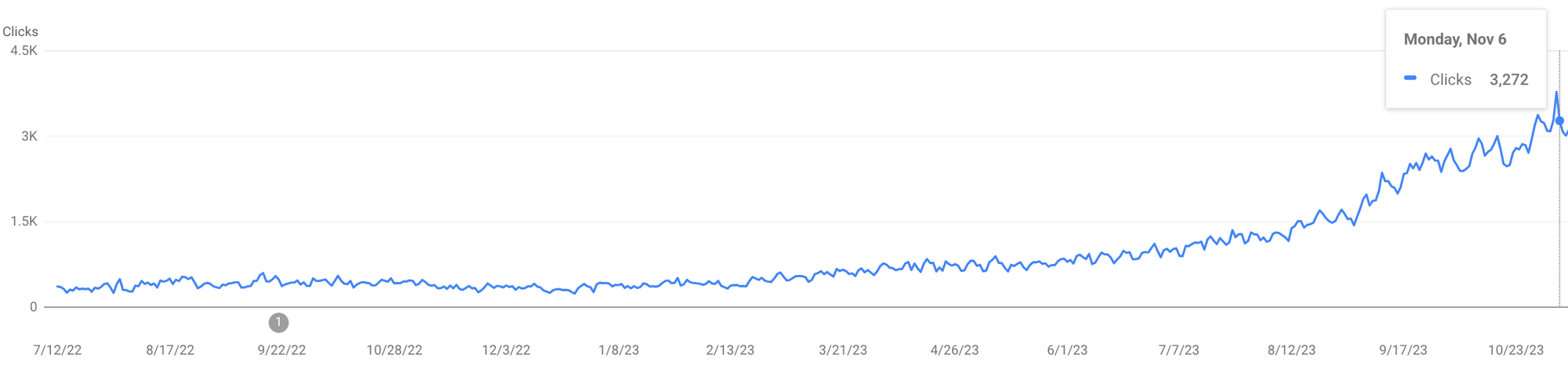
I grew my client's site from 5K to 90K visitors/month in 7 months using the system and SOPs shared in that guide:
Read the reviews and more about the guide here.
Grab a 10% discount with this code: FRIENDS10
—
Thanks for reading.
—Benny